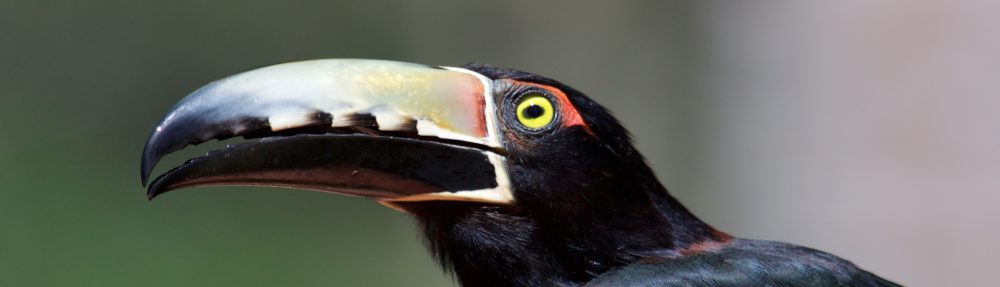
As I mentioned in my earlier post, the Chambal Safari Lodge was one of the highlights of our most recent trip to India, both in terms of wildlife and hospitality. I’ve been meaning to put together a gallery of some of the better shots that I took in the couple of days we were there, so here it is.
New Versions of Pin Your Pics and WeighMe
I’ve just submitted new versions of both of my apps on the App Store. Pin Your Pics had a bug in the ‘group by 50’ table, which meant that the cells comprising the sets of images was empty. I actually need to do a pretty major overhaul of the code base, as I learned a lot about threading in the process of updating WeighMe with the motion activity functionality. I finally got the async functionality [which I posted an update on a few weeks ago] working. I didn’t change the algorithm that I discussed in the post that substantially, however testing indicated that putting counters in the KVO wasn’t reliable. The KVO still checks to see if the queue is at zero. What I simply did was to shift the ‘gatekeeper’ functionality into the method call which executes the plot.
The queue might be empty at the point in time the KVO executes, but that doesn’t mean that there isn’t more activity is in the pipe for the operation queue. As a consequence, in earlier versions of this code I was seeing my plotting method getting called repeatedly. On entry to the plotting method – which is going to be called every time the queue hits zero – I check for two values: the length of an array, which gets appended to by assignment to the operation queue, and also a boolean, which effectively ensures that the method is only ever executed once, when the array has the right number of values.
India Trip #3: On the Imodium Trail
We got back from our North India trip last night, and it turned out to be quite a roller coaster. First a few numbers:
– Number of pictures taken: 2124 [me] 954 [my wife]
– Tiger sightings: 3
– Number of times urinated on by treetop monkey: 1
– Number of road rage incidents observed: 3
– Of which, number that turned into fist fights: 1
We covered 6 separate venues: 3 nights in a boutique style hotel in Delhi called the Manor; one night in the alarmingly misleadingly named [but still quite charming] Grand Imperial in Agra; two nights in a wildlife reserve called the Chambal Safari Lodge, near the river of the same name; two nights near the Ranthambore National Park in Khem Villas; two nights in Jaipur in the Royal Heritage Haveli; then on the home straight, 3 nights in the Samode Palace [an actual palace], and then back to Delhi for our last night in the very swanky Imperial Hotel.
A few boxes to tick before we launch. We have used the same holiday company for the last 5 years now for our long haul holidays, who put together custom itineraries. We had more things go wrong on this trip than any other. First and foremost, we had a no-show on the second day with a photographer called Vicky Roy who was supposed to take us on a walking tour. Another guy appeared at the hotel, who kicked off with a very jet lag insensitive 10 minute PowerPoint presentation [something I wasn’t expecting to deal with outside normal office hours] of his sketches. He was a nice bloke, and we had a pretty interesting walk with him but his skills lay with his drafsmanship, not photography. We had a couple of other minor activities evaporate later on either because they were never going to work [daybreak shot of the Taj? Not at this time of year, unless you are really into fog] or which the guides simply thought better of on the day.
While the later points are nitpicking, the Vicky Roy thing wasn’t: we wouldn’t have stayed the third night in Delhi otherwise. The travel company did stump up for high tea at the Imperial in Delhi on the last day though, to soften the impact.
The lesson here is to make sure that the subject matter is as infallible as possible [i.e., they don’t load the Taj onto a truck every Thursday afternoon for a quick wash and polish], and the facilitating components are fungible [a guide, not the guide]. And remember to ask about the weather…
As the name of this post suggests, while it’s an exaggeration [exaggerate? Moi???] to say that India tried to kill us, it did have a good go at making the trip hard work. I missed the third day in Delhi in its entirety due to a stomach bug. My wife felt well enough to go on her own, but fainted while having a tour of the old city. Then on our second night at the Samode Palace, I had a recurrence of the digestion related challenges. Meanwhile, my wife had some sort of allergic reaction [no idea what to], which continued right up to the last night in Delhi when we had to get the doctor out.
Final observation before breaking down the itinerary high points, and sprinkling in some of the more interesting shots: we had a few new pieces of kit in the mix for this trip. We upgraded my wife’s old Lumix [barely better than her mobile phone’s camera] to the Canon S120, which we were very pleased with. We didn’t manage to make much of a dent in the 200 page manual before we left [PDF only, much to my wife’s chagrin], but there are enough similarities with Canon’s DSLR controls that we were able to bluff it. Speaking of DSLRs, while I had my 5D mk III for the trip to Spain earlier in the year, India was its first serious outing. I also took the plunge with the 1.4 mk III extender: full manual focus when combined with my 100-400 L, but I had enough experience at the long end of that lens to be able to cope: focusing through a series of shots is the trick, with the file format set to JPEG – kinder to the storage, given the hit rate.
We had a litany of upgrades, starting with the flight out to Delhi with BA, which we got bumped up to business class from premium economy [fab!]. The Manor Hotel is renowned for its food, and it certainly warranted its reputation. It reminded me of Benares in London, in terms of the level of refinement and even some of the menu options. The chef was filming a documentary in the grounds of the hotel while we were there. The room and standard of service was fantastic. That said, the location [the Friends Colony] isn’t great for the jetlagged visitor who isn’t feeling super adventurous at the start of their trip: it’s a long way south of the city centre and anywhere interesting.
I’ve already mentioned the walking tour we had on the first full day. We took in a small mosque and a huge Sikh temple, both of which were pretty interesting. We also hit a market and some sort of colonial era government building, neither of which I expect I’ll remember by the end of this week.

The guide explained that the person lying down may have been suffering from depression as he was beside the sarcophagus of a revered person:


From Delhi, we went went about 4 hours by car south east to Agra. It’s a rough, tough city, with extreme levels of poverty apparent and, without a shadow of a doubt, the hairiest traffic that we have ever encountered on any of our trips. I have blogged about the challenges of crossing the road in Hanoi during rush hour, which is quite scary to the uninitiated. At least there, there was a system with the traffic. In India in general, and Agra in extremis, the traffic is utterly chaotic. There is some engineering work going on with the replacement of one of the bridges over the river Yamuna, and the narrowing of the flow of the traffic this necessitated caused one of the worst traffic jams I’ve ever seen [bear in mind this is our third trip to the sub-continent], and was the site of our first road rage incidents. The guy in front of us must have clipped another vehicle, the driver of which decided to drag Mr 4×4 out of the car by the lapels. He was about to whack him, but thought better of it – possibly because he was compounding the traffic problem. So if you add a myriad of motorbikes weaving through the stationary or slow moving traffic, quite a few horse- and camel-drawn carts to the mix, it makes for quite a colourful recipe. It’s quite frankly a miracle that we got through the entire trip with nothing more significant than nudging the handlebar of a bike.
The star of the show in Agra is, obviously, the Taj Mahal. It is simply stunning.

We took in a couple more venues, including the Red Fort, the ‘mini Taj’ and an evening tour of a village called Kachpura. The latter is being sponsored by an NGO which is looking to develop sustainable skills for the villagers. It was very interesting: we were followed by a group of local children [a constant refrain for the holiday] who broke into paroxysms of laughter when we took / showed them their photographs. We were supposed to stop off somewhere along the way to take sunset snaps of the Taj [the other side of the river from the village]. I’m not sure why this fell off the agenda – possibly because we were running late – but to be honest, we were both still feeling pretty rotten, so were happy enough to hot tail it back to the Grand Imperial. It was an odd spot – faded charm would cover it – but we both really enjoyed it. We were the only diners in the vast restaurant, clad head to tail in green marble, so had about 6 [probably very bored] waiters flurrying round us to do vitally important tasks like repositioning cutlery after a new dish arrived. It was one of those faintly comical situations where I’d have been barely surprised if one of them had offered to cut my food for me. Final observation on the extreme staff to customer ratio: the sitar player stopped mid-tune to ask us if we liked Indian music. I have to say I enjoyed the place.
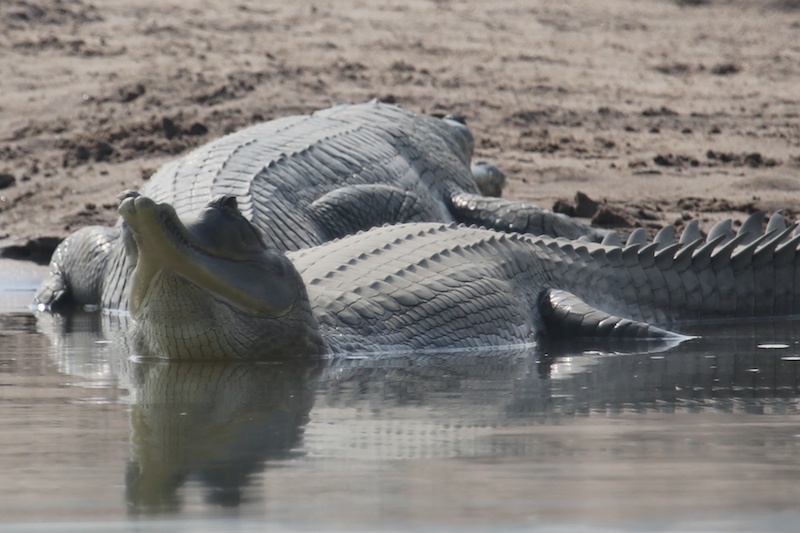
From Agra, we moved onto to one of the highlights of the holiday: the Chambal Safari Lodge. This was about an hour south-east of Agra, still in Uttar Pradesh, and it was fabulous. The food, staff and accommodation [a self contained lodge] were great, and the wildlife was astonishing. I sat down with the resident naturalist, the very knowledgeable Gajendra, and he ticked off 92 species of bird, mammal and reptile – this was at the end of the first full day. It’s my idea of heaven: pulling on my pair of ‘high performance trousers’ [a standing joke in our house: a pair of Rohan fast drying trousers that my wife hates], walking boots and long sleeve shirt, and then tramping through the undergrowth with someone who really knows what they’re doing, looking for exotic fauna. I’ll do a separate gallery of birds at the weekend, but here are a few tasters.


After a couple of nights at Chambal, we got a train which took us a couple of hours south-west into Rajasthan and to our next venue: the Khem Villas, just outside the Ranthambore national park. The accommodation and service were, again, very good. The vegetarian-only grub was served in a restaurant decked out with little braziers of hot coals between the tables: pretty atmospheric, but not particularly conducive to your standard issue, flailing drunkard who might fancy a quick stagger to the loo. Obviously not talking about myself here, this is a purely hypothetical observation :).
We had three safaris – early starts in temperatures hovering in the low single digits. The whole process of getting into the park is overly bureaucratic, if understandable. Rather than everyone [or as many people as can fill a jeep] from the same hotel taking the same tour, different zones of the park are allocated on a per group [or in our case, per couple] basis. We figured this meant that any sightings would be distributed across people from different hotels. Given that some of the zones might be better than others, this is probably less open to bribery. The downside of the hotel not being able to operate its own tours was massively different start times, with the last safari starting an hour late.
In short, we were very lucky. We saw tigers from the public highway on the way into the park. This caused a mini traffic jam, and some of the worst let’s-make-like-we-aren’t-here conduct you could imagine. One of the tigers roared, and about half a dozen people screamed. We had guides and drivers shouting at each other at the top of their voices, and people trying to clamber between vehicles. I guess there must have been about 10 or 15 jeeps and lorries clustered around the place. It was a bit of a mess. These were from about 30 feet away or so:


For what it’s worth, the tigers seemed oblivious, up to the point where a male decided to – shall we say – initiate a clinch of a romantic nature with the female. She was less enthusiastic and roared at him in a ‘clear off or I will bite your head off – literally’ sort of way. At which point, the observing humans broke into the aforementioned hysterics.
We saw tigers on both safaris on the first day [on the road into the park both times], and nothing at all on the final morning. We fluked it, and I can imagine that you could spend a week trying to spot something and come away empty handed. We actually saw not a lot of any significance within the park itself, apart from deer and a rather fine pair of pied kingfishers.

It may be the best chance you have of seeing a tiger in the wild in India [and it must be up there in global terms], but I’m not sure if I’d recommend Ranthambhore. The ‘naturalists’, or naturists as one of our dinner companions insisted on calling them in conversation earlier in the week, were of very broadly differing abilities [the last guy we had was clueless], and it has to be said that the ideas about appropriate conduct and personal safety leave a lot to be desired.
On that final point, I missed a shot [which I’ll come back to] on the second day of a cat that our naturalist identified as T24 – an adult male – who crossed the road about 10 feet behind our jeep. My wife managed to get a couple of shots while I was still trying to get set up:
![T24 [High ISO]](https://the-plot.com/blog/wp-content/uploads/2013/12/IMG_0587.jpg "T24 [High ISO]")
While his name might sound like a module on an Open University degree course, this lad has a reputation: he has killed four people [including a park ranger a few months back] since 2010. This has been quite widely reported. Whether the cat in the picture is actually the one in question we have no idea, but it’s what we were told.
Missing the shot: the safari drives can be incredibly dusty, and common sense dictated only getting the camera out of my bag when something interesting was happening and circumstances were favourable. I heard one bloke back at the hotel complaining to his partner that he’d gotten dust in his lens. I could hear the noise it was making – like turning a salt mill – from about 8 feet away.
Anyway, on the way into the park, you are required to sign a form that excludes the forestry department from liability if you happen to get yourself into any trouble. The forestry staff [guides and drivers] are unarmed, and the jeeps are pretty open. If this sounds hysterical, google it.
After our two nights at Khem, we had a roughly 3 hour drive north west to Jaipur, where we stayed at the Royal Heritage Haveli, where we had the next of our upgrades. I’m sure we were told that the former private residence started life as a hunting lodge. It’s laid out on multiple levels and, while the buildings actually predate it, the style struck me as having Georgian overtones. We had a self-contained suite, the bathroom of which was bigger than plenty of hotel rooms that I’ve stayed in. The food was very good, although a warning for the faint of heart: the Thali tasting menu which we had on the first night was enough to feed about 4 rugby players.
We ticked the boxes for any visit to Jaipur: the observatory [the Jantar Mantar], the palace of the winds, and the city palace. I think I’ll probably remember more fondly the game of croquet that we played at the hotel – by our own nutty rules! – and haggling for a pair of camel leather slippers on the Amber road which, on closer inspection, it turns out are partly constructed from rivets. Nice.


We were starting to wind down by this stage, so our final destination [barring the necessary return to Delhi] was the Samode Palace, which is only about an hour north of Jaipur, where we had three lazy days by the pool. It’s a proper palace, albeit one that was built by a relatively minor member of the royal family in that region in the 16th century. I had the same thought as when we were trailing around the Taj Mahal: surprise that it’s open to the public, or that there aren’t any armed guards following you around to make sure you don’t touch or break anything. Echoing the inlay work in the Jaipur City Palace, there is a room with thousands of mirrors in the walls and ceilings, surrounding the original murals and masonry detailing. Our own room [our third upgrade] was fab. We had a private balcony where every evening we watched a troupe of monkeys [googling suggests common langurs] lay siege to banqueting tables, light fittings, and pretty much anything that wasn’t bolted down.

I love that one of the guys working at the hotel turned on the lights on the outside of the building just for me to take picture:

Our final trip, five hours north east of occasionally terrifying traffic, took us back to Delhi, and the imposing Imperial Hotel for our final night, and the last of our room upgrades. Not much to report here: we’d had a long day by the time we got there. That, combined with the fact that my wife wasn’t feeling great, meant that we didn’t really have the chance to get much of a feel for the place. We had a great curry in one of their restaurants [Daniel’s Tavern] which must have set a record for us: because we were expecting the doctor to arrive [he was on call] I think we were done and dusted in about 25 minutes.
So: given our north and south sub-continental experiences, it probably worth a quick roundup to compare. The north: drier, more camels [!], more imposing architecture, grinding poverty. The south: much friendlier, harder to get to [no direct flights], less terrifying traffic and, by nature of our coastal proclivities, more ’touristy’. While there is plenty more that to see and do in the north, I couldn’t see us doing anything other than launching directly from Delhi. It was tough work. Good fun though.